
Production labor scheduling: book people and space together
An empty bay cannot start a job without its crew. Book both together, separate setup from labor-hours, and check what moves when someone is away.
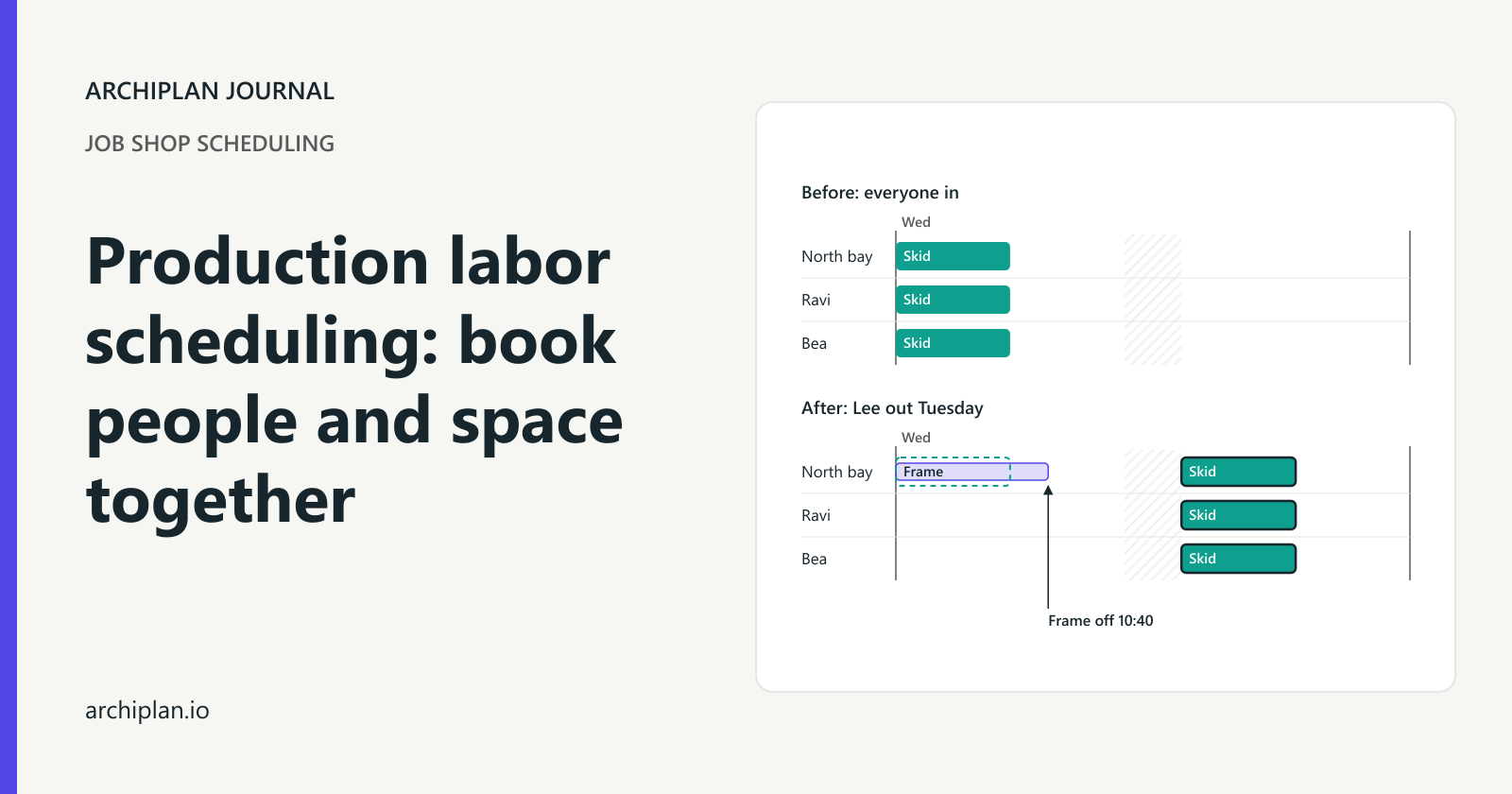
The bay is free, but the people needed for the job are on other work. Put the job there anyway and the next order queues behind something that cannot start. Book the named, qualified people and the workspace together, then work out the finish from the crew available on each shift.
Take a made-up fabrication shop building one service frame in North bay. The kit is ready and fabrication is complete before Monday at 08:00. Maya and Ben set it up; Lee joins them for assembly. Losing Lee on Tuesday moves the frame into Wednesday and changes when the next job can use the bay.
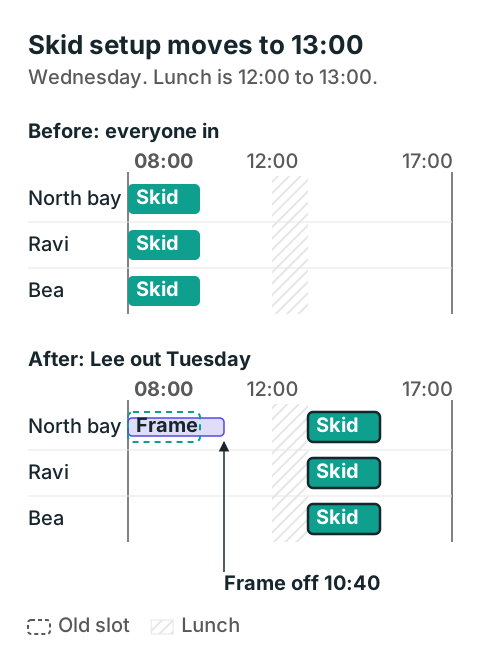
North bay frees at 10:40, too late to fit the two-hour skid setup before lunch. The dashed outline marks the skid's old slot; the solid outlined bar marks its new one.
Download the example booking sheet (CSV). It contains the full-crew plan and the Tuesday absence plan, with separate rows for each person and the bay. Open it in Excel and filter to one plan before checking bookings.
Four setup hours can use eight labor-hours
Everyone works from 08:00 to 12:00 and 13:00 to 17:00, Monday to Thursday. The frame, job 1048, is due Wednesday at 12:00. The people and North bay have no other bookings at the start of the plan.
| Work | People | Time needed |
|---|---|---|
| Setup | Maya and Ben together | Four working hours; eight labor-hours |
| Assembly | Two or three of Maya, Ben and Lee | 36 labor-hours shared across the crew |
| Bay occupancy | North bay | From setup start until the finished frame leaves |
Maya and Ben are qualified for setup, and all three are qualified for assembly. Setup takes four hours with both people present. A third person does not shorten it: the shop's setup process still takes that long.
For assembly, this shop has approved either two or three people working together. The tasks can be shared so that each person completes one labor-hour of work per working hour. The frame can stay in place through lunch and overnight without extra restart work. Confirm those conditions for your own job before dividing labor-hours by crew size.
With all three present, the bookings are:
| Shift slot | Work | Crew | Assembly work left |
|---|---|---|---|
| Monday 08:00 to 12:00 | Setup | Maya, Ben | 36 labor-hours |
| Monday 13:00 to 17:00 | Assembly | Maya, Ben, Lee | 24 labor-hours |
| Tuesday 08:00 to 12:00 | Assembly | Maya, Ben, Lee | 12 labor-hours |
| Tuesday 13:00 to 17:00 | Assembly | Maya, Ben, Lee | None |
The frame finishes Tuesday at 17:00. Assembly has taken 12 working hours with three people. Add the setup's eight labor-hours and the whole job uses 44 labor-hours.
Keep the bay booked from Monday at 08:00 until Tuesday at 17:00. The people go home between shifts, but the frame still occupies the space. Lee is free during Monday's setup because that phase needs only Maya and Ben.
Keep one booking row per person
The booking sheet uses six columns: Plan, Resource, Job, Work, Start and Finish. Each person gets a row for every working slot. The bay gets one continuous row where the unfinished frame stays in place.
Here are Monday's person rows and the bay hold for the full-crew plan:
| Resource | Work | Start | Finish |
|---|---|---|---|
| North bay | Frame stays in place | Monday 08:00 | Tuesday 17:00 |
| Maya | Setup | Monday 08:00 | Monday 12:00 |
| Ben | Setup | Monday 08:00 | Monday 12:00 |
| Maya | Assembly | Monday 13:00 | Monday 17:00 |
| Ben | Assembly | Monday 13:00 | Monday 17:00 |
| Lee | Assembly | Monday 13:00 | Monday 17:00 |
One continuous bay row makes it easy to see that the space stays occupied through lunch and overnight. If you use separate rows instead, cover every gap where the frame stays put and keep the rows from overlapping.
The CSV contains checked example bookings, without formulas or automatic rescheduling. Replace the weekday labels with your real dates when making a live plan. Filter to one plan, then sort by Resource and Start using real date-and-time values. If a booking starts before the previous one ends, that resource is double-booked. Check attendance and qualifications too; an empty row does not tell you who can do the work.
For each working slot of divisible assembly work, calculate:
Work completed = working hours × people assigned
Work left = previous work left − work completed
Time for the last slot = work left ÷ people assigned
Stop at lunch or shift end and carry the balance forward. Cap completed work at the amount left. For setup that takes a fixed time, keep its working hours unchanged and multiply by people to calculate labor-hours.
In an ERP, inspect the bookings for a sample job after scheduling it. For example, Dynamics 365 documents separate worker and location resources, with primary and secondary operations for booking resources simultaneously. A crew-size value alone does not show you whether the people and space are booked; check how your system handles both.
Lee is out on Tuesday
Monday is already complete when you learn Lee will be away all Tuesday. Maya and Ben can continue assembly under the shop's approved two-person process. Lee returns Wednesday at 08:00.
| Assembly slot | Crew | Work completed | Work left |
|---|---|---|---|
| Monday afternoon, complete | Maya, Ben, Lee | 12 labor-hours | 24 labor-hours |
| Tuesday 08:00 to 12:00 | Maya, Ben | 8 labor-hours | 16 labor-hours |
| Tuesday 13:00 to 17:00 | Maya, Ben | 8 labor-hours | 8 labor-hours |
| Wednesday 08:00 to 10:40 | Maya, Ben, Lee | 8 labor-hours | None |
Tuesday's smaller crew completes 16 labor-hours. The eight left take two hours and 40 minutes with three people on Wednesday, so the frame finishes at 10:40. It still meets its Wednesday 12:00 due date.
Start this calculation from the latest estimate of work left. Leave completed work alone. If Monday produced less than planned, change the remaining work as well as Tuesday's attendance, and record who supplied the new estimate.
The next order is job 1051, a pump skid. Its kit is ready Wednesday at 08:00, and it needs two uninterrupted setup hours in North bay. Ravi and Bea are qualified and free through Wednesday's working slots. Its setup is due Wednesday at 17:00.
The skid originally fitted Wednesday from 08:00 to 10:00. Now the frame occupies the bay until 10:40, leaving too little time before the 12:00 lunch break. Book the skid, Ravi and Bea together from 13:00 to 15:00. Its setup still meets the due time.
Check whether a smaller crew can do the job
If the approved assembly process requires all three people, Maya and Ben cannot continue while Lee is away. The remaining 24 labor-hours wait until Wednesday and take its full working day, finishing at 17:00. The frame is then five elapsed hours late. Tell the person promising delivery, and check the skid's next slot against its crew's availability before booking it.
Someone booked on another job is also unavailable, even when they are at work. Split the shift at the other booking's start and finish, and count only qualified people who are free. Omar's guard assembly in South bay stays on Monday morning: it uses a different person and space.
Before releasing your next plan:
- Separate setup from assembly and name the people each needs.
- Check their attendance, skills and other bookings.
- Hold the bay through gaps while the job stays there.
- Recheck the next job waiting for that space and tell the affected people what moved.
The shop is made up; the crew hours and booking times were checked by recalculating the schedules.