
Work-in-progress tracker: see what's ready for the next operation
Track partial batches, held quantities and accepted handoffs with a filled event log and current job view.
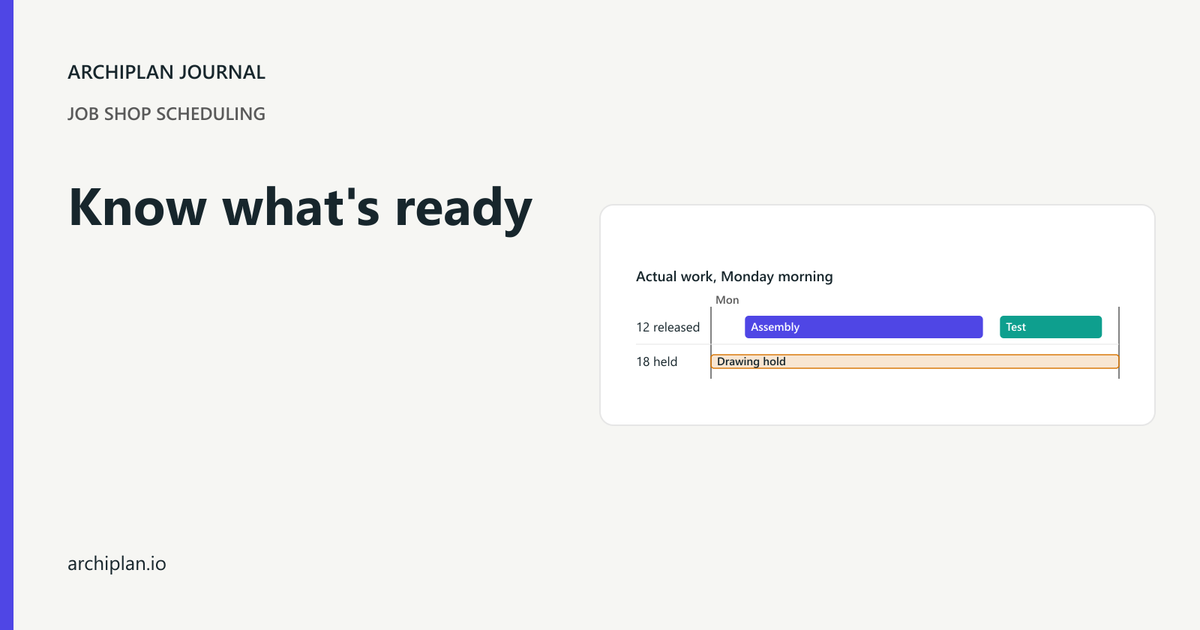
The cutting screen says the bracket order is done. Assembly has only part of the batch and nobody can tell you where the rest is. Track each accepted handoff by quantity and time, then build the current job view from those movements so you can see exactly what is ready to run next.
Download the WIP event log and the current job view. Both are filled CSV examples. They open in a spreadsheet; the current view is a checked snapshot, so editing the log does not update it automatically.
Take a made-up fabrication shop with cutting, assembly and testing. Job 1042 is thirty brackets. All thirty come off the laser, but Dana releases only twelve to assembly while the other eighteen wait for a drawing check. A single "cut complete" label hides that split.
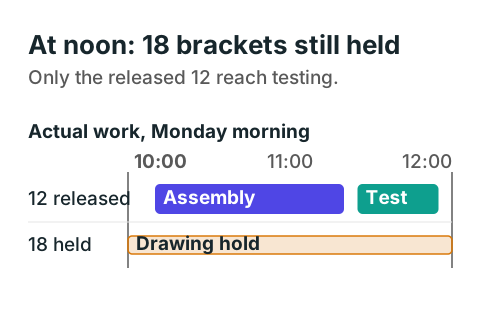
The eighteen held brackets stay at cutting while the released twelve pass through assembly and testing. Their next available date is unknown until the drawing check is resolved.
Count what assembly actually receives
At 10:00, Sam finishes the laser work. The thirty brackets go into a labeled hold area. At 10:05, Dana confirms that twelve can proceed and Maria accepts that quantity at assembly. The order quantity stays thirty throughout.
| At 10:05 | Quantity | Can it enter assembly? |
|---|---|---|
| Cut and held for drawing confirmation | 18 | No |
| Released and accepted at assembly | 12 | Yes |
| Total bracket order | 30 | Partly ready |
Write a separate movement for the twelve, with the source location, destination and the person who accepted them. Keep the held quantity visible. Changing the whole order's location to "assembly" would tell the planner that all thirty are there.
In this shop, a labeled partial transfer is allowed. If your process requires the whole batch together, keep the order blocked until all required pieces are released. A tracking sheet records that rule; it does not grant permission to split a batch.
Sam's laser setup and run take thirty and ninety minutes, from 08:00 to 10:00. Material is ready, Sam is signed off and the laser is free. Dana records the separate drawing release before assembly can start.
Keep a movement log that survives a status change
The example event log has six columns: time, job, quantity, from, to and updated by. Here are the handoffs for the released brackets:
| Time | Quantity | From | To | Updated by |
|---|---|---|---|---|
| 10:00 | 30 | Cutting | Cut hold | Sam |
| 10:05 | 12 | Cut hold | Assembly ready | Dana |
| 10:10 | 12 | Assembly ready | Assembly | Maria |
| 11:20 | 12 | Assembly | Test ready | Maria |
| 11:25 | 12 | Test ready | Testing | Tom |
| 11:55 | 12 | Testing | Ready to ship | Tom |
Each row moves that many pieces from one state to the next. "Assembly ready" means accepted input waiting for Maria. "Assembly" means Maria has started it. "Test ready" means it is waiting for Tom. Keep those distinctions if you want to tell waiting work from work actually running.
Dana maintains the current view after each accepted event. At 10:00, its bracket row shows thirty in "Cut hold." For the 10:05 handoff, she subtracts twelve from that row, leaving eighteen, and adds a row with twelve in "Assembly ready." At 10:10, she subtracts those twelve from "Assembly ready" and adds them to "Assembly." Keep the event rows and remove a zero-quantity row from the current view. Apply that same subtract-and-add step to every later movement, then check the order total.
Give each movement a unique event ID in your working system. The short example uses time and the movement fields for its duplicate check, all within one Monday. Add the date and event ID when using the layout across shifts or days. A repeated scan must not move the same twelve pieces twice.
If someone posts the wrong quantity, retain the original record and enter an identifiable correction under your shop's approval process. Recheck the affected balances before releasing work. Deleting an inconvenient row makes it hard to explain why the current count changed.
Read the current view before releasing the next job
Maria starts assembly at 10:10. Ten minutes of setup plus five minutes per bracket uses seventy minutes, so the twelve finish at 11:20. Tom accepts them for testing at 11:25. Testing takes two and a half minutes per bracket and finishes at 11:55.
Maria, the bench, Tom and the test station are free and qualified for these slots. Everyone works 08:00 to 12:00 and 13:00 to 17:00. No operation crosses lunch, and testing starts after assembly finishes. These are checked example times, not standard cycle times for your parts.
At noon, the current job view contains these rows:
| Job | Quantity | Current state | Next action |
|---|---|---|---|
| 1042 brackets | 18 | Cut hold | Dana confirms drawing release |
| 1042 brackets | 12 | Ready to ship | Dana dispatches the approved partial shipment |
| 1043 covers | 8 | Waiting material | Dana confirms material arrival |
| 1044 guards | 6 | Ready to ship | Dana dispatches the complete order |
The six guards were tested, packed and released before this plan started. The covers have not started because material is missing. Each order keeps its own pieces and state; adding the two ready-to-ship rows gives eighteen ready pieces across two different orders, not eighteen completed bracket orders.
For the twelve brackets, all required dispatch checks are complete and the customer has approved partial delivery. The other eighteen remain held. The thirty-piece order is therefore still incomplete, even though one batch can ship. Use your own approved release criteria for "ready to ship," including any packing or paperwork needed after testing.
Check the balances behind the labels
For each order, add the quantities in every current state. They must equal the released order quantity after accounting for any separately recorded scrap, rework or quantity change. The bracket view has twelve plus eighteen, which equals thirty.
Before accepting a movement, check that its source contains enough pieces. Moving thirty-one from a thirty-piece hold is an error. Moving the released twelve again after they have left that source is also an error. Both movements failed when we checked the example. The CSV does not check balances or update the current view automatically; Dana does those checks before posting a movement.
If pieces return from testing for rework, create the return movement and show its reason. Do not count the same pieces as both finished and in assembly. Use a clear state for rejected or scrapped work if it occurs; the example has neither.
Choose the update owner at each handoff. Sam records the laser finish, Dana records the drawing release, Maria records assembly start and finish, and Tom records testing. Dana checks the current view before changing the next schedule. Where another person receives the batch, record acceptance as well as the sender's completion.
Use status to check the plan
The tracker tells you which input is available. You still need a schedule for the machine and qualified person. Before assigning the next assembly slot, check the released quantity, material, drawing and the actual finish of any previous job.
Booking people and workspace together covers that next planning decision. A status update alone cannot make Maria or her bench free.
For a small starting point, take one order through its next handoff tomorrow. Label the batch, agree who accepts it and record the quantity as it moves. Then:
- Reconcile the pieces in the current view with the physical batch.
- Keep held work visible with a named owner and next action.
- Check the accepted input before releasing the next operation.
- Keep the event history when you update the current status.
The shop in the example is made up; its quantities and operation times were checked by recalculation.