
Should technicians see their full day's schedule?
Let technicians prepare parts without losing control of dispatch. Use a day-view policy, clear job statuses and a checked supplier-pickup example.

A technician can't prepare parts for a job they can't see. Show the day's assigned work and the future visits that need preparation, with later calls clearly marked as provisional. Keep one confirmed next call so seeing a job doesn't become permission to change the route.
A missing motor changes the morning
Take a made-up four-technician HVAC business. Priya leaves the depot at 08:00. Her first call is a 40-minute inspection at Oak Road, with arrival agreed for 08:20–08:40. Her second is a 40-minute motor replacement at Birch Close, with an agreed arrival window of 09:15–09:45. Priya is qualified for both jobs. The correct motor is reserved at the supplier from 08:00, and pickup takes ten minutes.
The motor replacement includes the job's normal setup and completion checks. All travel times below are the dispatcher's estimates for this morning. Priya's shift is 08:00–12:00 and 13:00–17:00; neither version reaches lunch. Oak Road is already confirmed and stays first.
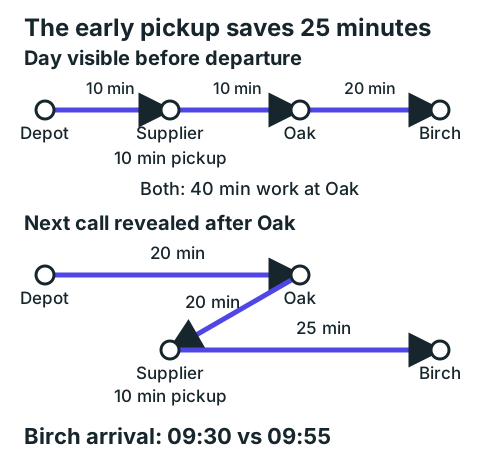
With the day's work visible before departure, Priya and dispatch agree to collect the Birch motor first. The supplier is ten minutes from the depot, and Oak is another ten minutes away. After pickup she reaches Oak at 08:30, finishes at 09:10 and drives 20 minutes to Birch. She arrives ready to work at 09:30 and finishes at 10:10.
If Birch appears only after Oak closes, Priya drives straight from the depot to Oak in 20 minutes and finishes the inspection at 09:00. She reads the Birch parts note before travelling, so she knows to collect the motor. But Oak to the supplier takes 20 minutes, and the supplier to Birch takes 25. With the pickup, she reaches Birch at 09:55 and finishes at 10:35. The arrival misses the window by ten minutes.
The later pickup adds 25 minutes. These are directional morning travel estimates, including the different approaches to the supplier. Visibility helps because dispatch can place the pickup before Oak while keeping Oak's arrival window. Priya reading the next call carefully at 09:00 cannot recover that earlier opportunity.
Give the team a day view and a clear next call
Use a small set of statuses that mean the same thing in the office and the van. A technician should be able to tell what to prepare, where to go now and which later assignments might change.
| Status | What the technician can do | What dispatch owns |
|---|---|---|
| Working | Carry out and report the current job | Handle changes affecting later work |
| Next, confirmed | Prepare and travel when released | Confirm customer access, parts and assignment |
| Later today, provisional | Read the scope and flag missing parts or skills | Confirm or revise the order before travel |
| Future visit, preparation needed | Check parts, equipment and access requirements | Confirm the date, allocation and customer promise |
Avoid using "scheduled" to mean both a customer appointment and a tentative technician assignment. A customer's arrival window may stay fixed while the person attending changes. Keep the window, current assignment and dispatch status in separate fields.
Priya's Birch job should show the motor identifier, supplier pickup, the arrival window and any access instructions relevant to her work. A note saying "motor ordered" leaves too much unanswered. The dispatcher needs to know whether it is available for collection, whether the identifier matches the unit and who is collecting it.
Let technicians see enough to prepare tomorrow
Tomorrow's likely work matters when a part needs collecting today or a van needs different equipment. Open the future view far enough to cover your actual preparation lead time, then mark uncertain assignments clearly. You don't have to promise that every visible call will stay with the same technician.
Existing products already separate visibility from permission to act. Sera's mobile documentation describes future appointments as read-only and keeps the appointment-claiming sequence separate. Company and individual permissions control access. ServiceTitan's instructions for future jobs point administrators to Upcoming Appointment Visibility in the technician profile.
Those settings show where to look if your team currently sees one call at a time. Test the actual account and app your technicians use. A setting being available doesn't establish that the necessary parts notes or arrival windows are visible to them.
Start with assigned work and the preparation details each technician needs. The dispatch board can still hold the wider queue, reassignment options and office-only notes. Give each role access to the information needed for its work, and check that future views follow the same rule.
Make changes obvious before anyone drives
A revised day view is easy to miss if a technician already checked it at breakfast. When dispatch changes the confirmed next call, send a direct update and require acknowledgment before the technician travels. Record the new next call and the time it was confirmed in the same job system or dispatch record.
Use a short message with the changed job, the new next stop, the arrival window and any parts action. Before Priya leaves the depot, that could be: "Collect the reserved Birch motor first, then Oak. Oak arrival 08:20–08:40; Birch arrival 09:15–09:45. Confirm the pickup before setting off."
If Priya has no connection, keep the last confirmed next call in force until dispatch reaches her, unless the team has an agreed stop-work or emergency rule. A provisional job changing silently on a screen shouldn't send a van in a different direction. Give the office a practical phone fallback.
When a current job runs long, use the same-day HVAC replanning method to check the remaining windows before confirming a replacement call. Visibility supplies information; somebody still has to check whether the revised route fits.
Find out why the parts run happened
Use Priya's missed window to ask a precise question: when could she first see that Birch needed a supplier pickup? If the detail existed but she couldn't access it, change the visibility. If the motor wasn't reserved, fix the parts-readiness process. If nobody knew the identifier, showing the whole week won't supply it.
A useful neighboring case is a van that already carries the right motor. Priya could then drive straight to Oak, finish at 09:00 and reach Birch at 09:20. She would finish at 10:00. The pickup route offers no benefit in that case. Keep the parts note current so a preparation policy doesn't turn into an unnecessary stop.
Try the day view with one technician and the dispatcher on the next working day. Before the first departure, check that the technician can identify the confirmed next call, read later parts requirements and tell which assignments may change. After the shift, review any unexpected return trips and the information missing before each departure. Change the field or handover that caused the trip.
ArchiPlan Editorial publishes our planning guides. Artyom Rabzonov is responsible for product and editorial direction.
Artyom on LinkedIn · ArchiPlan on LinkedIn · How we check examples