
One operator, multiple machines: schedule the attention each job needs
Plan setups, checks and unloading separately from automatic machine time. A checked two-mill example shows when one operator can cover both jobs.
Two machines are free, but both jobs need Sam to get them started. Book the setup, checks and unloading on Sam's calendar, and overlap only the machine time the shop has approved to run without his attention. Dividing an operator's hours between jobs won't show you whether both machines need him at the same moment.
Two machines, one pair of hands
Take a made-up six-machine shop. Sam is qualified on both mills and is working 08:00–12:00, then 13:00–17:00. Neither job has started. The material, fixtures and proven programs are ready at 08:00, and both batches are due at 10:00.
The flange order is 20 small pieces at three minutes each. The housing order is ten small pieces at six minutes each. During each 20-minute setup, Sam loads a pallet fixture holding that whole batch. The proven program indexes through every position without manual reloading.
Each job also needs a five-minute in-cycle check and ten minutes to unload and close out. The checks happen while the approved automatic cycle continues: 30 minutes after the flange cycle starts and 20 minutes after the housing cycle starts. Walking between the adjacent mills is included in the attended times.
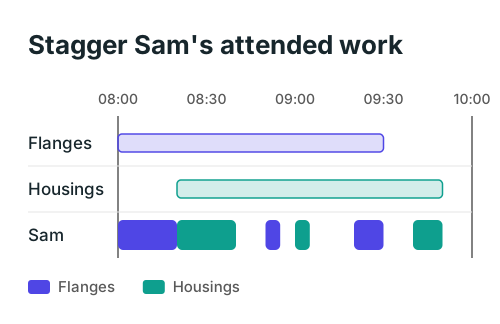
The flanges run automatically from 08:20 to 09:20. Sam sets up the housings from 08:20 to 08:40, checks the flanges at 08:50 and the housings at 09:00, then unloads each machine in turn. The flanges finish at 09:30 and the housings at 09:50. Both meet the 10:00 due time.
Starting both setups at 08:00 would double-book Sam for 20 minutes. Starting the housings only after the flanges are fully finished would be feasible, but the housings wouldn't finish until 11:00. The staggered plan finishes them 70 minutes earlier without asking Sam to do two things at once.
Copy the attended work onto a separate line
Keep the machine booking and the operator booking separate. The machine remains occupied through setup, its automatic run and unloading. Sam is booked only for the parts that require his attention.
| Work | Mill booking | Sam's attended work |
|---|---|---|
| Flanges | 08:00–09:30 | Setup 08:00–08:20; check 08:50–08:55; unload 09:20–09:30 |
| Housings | 08:20–09:50 | Setup 08:20–08:40; check 09:00–09:05; unload 09:40–09:50 |
Sam has 70 minutes of attended work across this 110-minute window. The remaining 40 minutes aren't one convenient block: the gaps are 08:40–08:50, 08:55–09:00, 09:05–09:20 and 09:30–09:40. A separate 30-minute setup won't fit into any of them.
That is the trap in a daily labor total. Enough spare minutes across a morning doesn't mean a person is available for the next uninterrupted task. Put each required visit on the time axis before accepting another job.
For your own board, record the job, machine, qualified operator, setup start and finish, automatic run, required check times, and unloading. Add the time needed to walk, obtain a gauge or record results where it actually occurs. If those minutes are missing from the estimate, the apparent gap is overstated.
Decide what really can run without Sam
Ask the person responsible for the process which parts need continuous attendance. A proven automatic cycle can have a different attendance requirement from a first-off run, an awkward casting or a job with frequent chip clearing. The schedule should carry that distinction rather than treating every minute of every job alike.
For a continuously attended operation, book Sam and the machine together for the full operation. For an approved automatic run with fixed checks, book each check explicitly. For a job that needs irregular attention and has no reliable estimate yet, keep the operator booked until the shop establishes a workable pattern.
The purpose of this distinction is to represent the shop's agreed working method. It doesn't establish that a process is suitable for unattended running. Get that decision from the people responsible for the machine, process and safety before changing the bookings.
Microsoft's job-scheduling documentation distinguishes setup, processing and other detailed jobs and describes matching required resources to available capacity. Use that kind of separation when you test a scheduling system. A single total duration can hide the attendance pattern you need to see.
Check the next collision before adding a third machine
Read Sam's line from left to right. Every required task must fit outside his other bookings, breaks and absence. Read each machine line too: a free operator doesn't release a mill that still holds the previous batch.
Then change one fact. Suppose the flange check takes 15 minutes instead of five. It now runs from 08:50 to 09:05 and clashes with the housing check at 09:00. The original stagger no longer works. Moving the housing setup to 08:25–08:45 moves its check to 09:05–09:10 and its finish to 09:55. The flanges still finish at 09:30, and both jobs still meet 10:00.
Don't slide a mandatory check later just to clear a clash. Here the housing run starts later, so its check moves with it. A fixed-time check, a tolerance on when it happens and a check that can wait until unloading are different requirements.
Use the same test for a third machine. Put its setup and every required return visit into the remaining gaps. If one doesn't fit, delay its start, use another qualified operator or leave it waiting. Count the real visits before assuming that another automatic machine creates spare capacity.
Test the software with the operator line visible
A system that records half an operator against each of two jobs may allocate labor cost correctly. That figure alone doesn't prove it prevents simultaneous setups or checks. Ask the supplier to show Sam's actual bookings in this example, including the longer flange check.
Machine reporting can also use the word "unattended" for a different purpose. MachineMetrics' machine schedules distinguish attended and unattended shifts for availability reporting. That setting isn't evidence that your job-level operator clashes have been checked.
If you're collecting the facts for this test, start with the production scheduling inputs your planner and operators can agree on. For work that needs several people throughout, use the people-and-space scheduling check instead. The whiteboard, spreadsheet or scheduler test helps decide whether maintaining these bookings by hand is still manageable.
At the next handover, pick two repeat jobs you already understand. Draw one line for each machine and one for the operator. Mark every setup, check and unload, then move a start time until the operator's work fits. Keep that agreed attendance pattern with the process so the next schedule starts from the same facts.
ArchiPlan Editorial publishes our planning guides. Artyom Rabzonov is responsible for product and editorial direction.
Artyom on LinkedIn · ArchiPlan on LinkedIn · How we check examples