
Production scheduling inputs: what to collect first
Collect the orders, operation times, people, calendars and readiness dates needed for a feasible production schedule, with a checked shop example.
You've inherited the production schedule, but nobody can tell you how much work the shop can finish. The lead times in the system don't match what happens on the floor. Start with the open orders, their remaining operations, the resources and time each operation needs, and the earliest point at which its materials and predecessor will be ready.
You can collect those facts for a small part of the shop before rebuilding every routing. Keep unknowns visible and use a checked estimate where you have one. A blank material-ready date must not quietly become permission to start.
A missing kit changes the finish
Take a made-up fabrication shop with Sam on the saw and Jo working between the drill and a fitting bench. They work from 08:00 to 12:00 and 13:00 to 17:00. Operations need continuous time; the shop does not split a setup or fitting operation across lunch. Nothing is already running.
There are two orders. Job 2101 is twenty-four mounting plates, due at noon. Job 2102 is sixteen machine guards, due at 14:00. Stock for cutting both orders is ready at 08:00, but the bought-in hinge kit needed to fit the guards will not be released until 11:30.
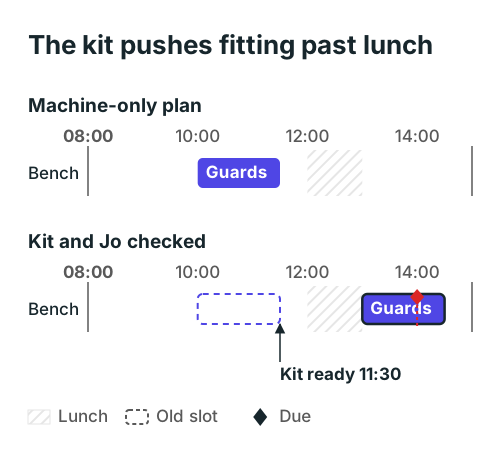
The plates still finish at 10:30. The guards finish at 14:30, thirty minutes after their due date. Their fitting bench was free earlier, but the operation was not ready to start.
| Order and operation | Resource and person | Setup + work | Checked slot | Required before starting |
|---|---|---|---|---|
| 2101 plates: cut | Saw, Sam | 15 + 45 minutes | 08:00–09:00 | Plate stock released |
| 2101 plates: drill | Drill, Jo | 30 + 60 minutes | 09:00–10:30 | Cutting complete |
| 2102 guards: cut | Saw, Sam | 15 + 45 minutes | 09:00–10:00 | Guard stock released |
| 2102 guards: fit | Bench, Jo | 30 + 60 minutes | 13:00–14:30 | Cutting complete and hinge kit released |
If the first plan considers only the saw and bench, it places guard fitting at 10:00 and promises a finish at 11:30. That plan misses Jo's drill booking as well as the kit. Adding Jo alone moves the start to 10:30. Adding the actual kit release and lunch moves it to 13:00.
Those are different missing inputs, with different owners. Jo can confirm the remaining drill work. Stores can confirm the kit release. Asking either person for a single order lead time would hide the reason the guards have to wait.
Collect one row per remaining operation
Keep the order's promised date on its order record. Then give each remaining operation its own row. An order total such as "three hours left" cannot tell you which machine needs those hours or whether another job blocks it.
| Field | What to record | Who can usually confirm it |
|---|---|---|
| Order, quantity and due date | The actual quantity and the date already promised | Order entry or planner |
| Operation and predecessor | What remains, in the order it must happen | Routing owner and floor lead |
| Machine and eligible alternatives | Where this operation is approved to run | Floor lead |
| Person or required skill | Who must attend setup and work | Supervisor |
| Remaining setup and work time | Separate estimates, with units and their source | Operator and estimator |
| Material and drawing release | The items this operation needs and their confirmed release | Stores and engineering |
| Working calendar | Shifts, breaks, absence and booked downtime | Supervisor and maintenance |
| Current status and check time | Not started, running, held or complete; when checked | Person responsible for the update |
Put a source and a last-checked time beside uncertain estimates. "Jo, checked this morning" gives you someone to ask when the plan changes. A number copied from an old routing without a check date is harder to defend.
The same structure appears in detailed scheduling systems. Microsoft's job scheduling documentation describes assigning jobs to resources, checking available capacity and considering material availability. That is a product example of the checks; you can collect the underlying facts in a simple job list.
Use the next start to find the missing facts
For every operation, ask what must be true before it can start. Its predecessor must be finished, the needed material must be released, and the machine and person must share a usable working slot.
For the guard fitting, cutting finishes at 10:00, Jo becomes free at 10:30 and the kit becomes ready at 11:30. The latest of those times is 11:30. Only thirty minutes remain before lunch, while fitting needs ninety continuous minutes, so the first usable slot starts at 13:00.
Do that check before treating empty space on the chart as capacity. In this example Sam has two hours of saw work and Jo has three hours across the drill and bench. The late order comes from readiness and the working calendar, rather than a fully booked day.
Record alternatives at the operation where they matter. If a different bench is available but Jo is still the only qualified fitter, that bench does not move the guard start. If another qualified person is available, the kit still prevents an early start. Booking people and workspace together helps make those simultaneous needs visible.
Test the information before expanding the plan
Change one input and recalculate the affected operations. Suppose stores confirms that the hinge kit can be released at 10:30 instead. Jo finishes drilling then, fits the guards from 10:30 to 12:00 and meets the 14:00 due date. The same jobs and working hours now produce a different, feasible finish.
That is a useful first test of your data. You can explain the date change through a real event: an earlier kit release. You have not changed the customer's due date or assumed faster work.
For a running job, replace the original duration with the operator's current estimate of work remaining. Keep its actual start and completed quantity. For a partly transferred batch, confirm how much the next operation has accepted; a whole-order "complete" flag can overstate what is ready. A work-in-progress tracker can hold that handoff separately from the schedule.
Start tomorrow with a few open orders that share a resource. Check their remaining work with the floor, write down the next missing input and name who will confirm it. Build a feasible sequence from those rows before deciding whether the planning method needs changing.
The example shop is made up; its times were checked by recalculating the schedule.