
How many HVAC service calls fit in a day? Count the whole route
Work out how many HVAC calls fit using visit time, travel, paperwork and a protected reserve. Includes a checked example and downloadable capacity worksheet.

Four repairs with long drives can fill a day that easily holds more short maintenance visits. To set a useful call limit, add the actual service time, driving and paperwork, protect breaks and a reserve, then check whether the route fits the shift. A call count on its own cannot tell you whether another booking is safe to promise.
Use the day-capacity worksheet to start with one technician's actual route. The numbers below are a worked example, not a target for every technician or a reason to hurry a repair.
Four calls leave room; a fifth uses it
Take a made-up residential service team. Ellis works 08:00–17:00, with a briefing from 08:00 to 08:15, lunch from 12:00 to 12:30 and van restocking from 16:45 to 17:00. Dispatch protects forty-five minutes for ordinary variation. That reserve is a local planning choice for this example, not an industry standard.
Ellis is qualified for all the booked work and carries the required parts. Customers have agreed to arrival during the working day; there are no tighter appointment windows in this calculation. On-site work can pause for lunch where Ellis confirms that is safe. Travel and paperwork are counted too.
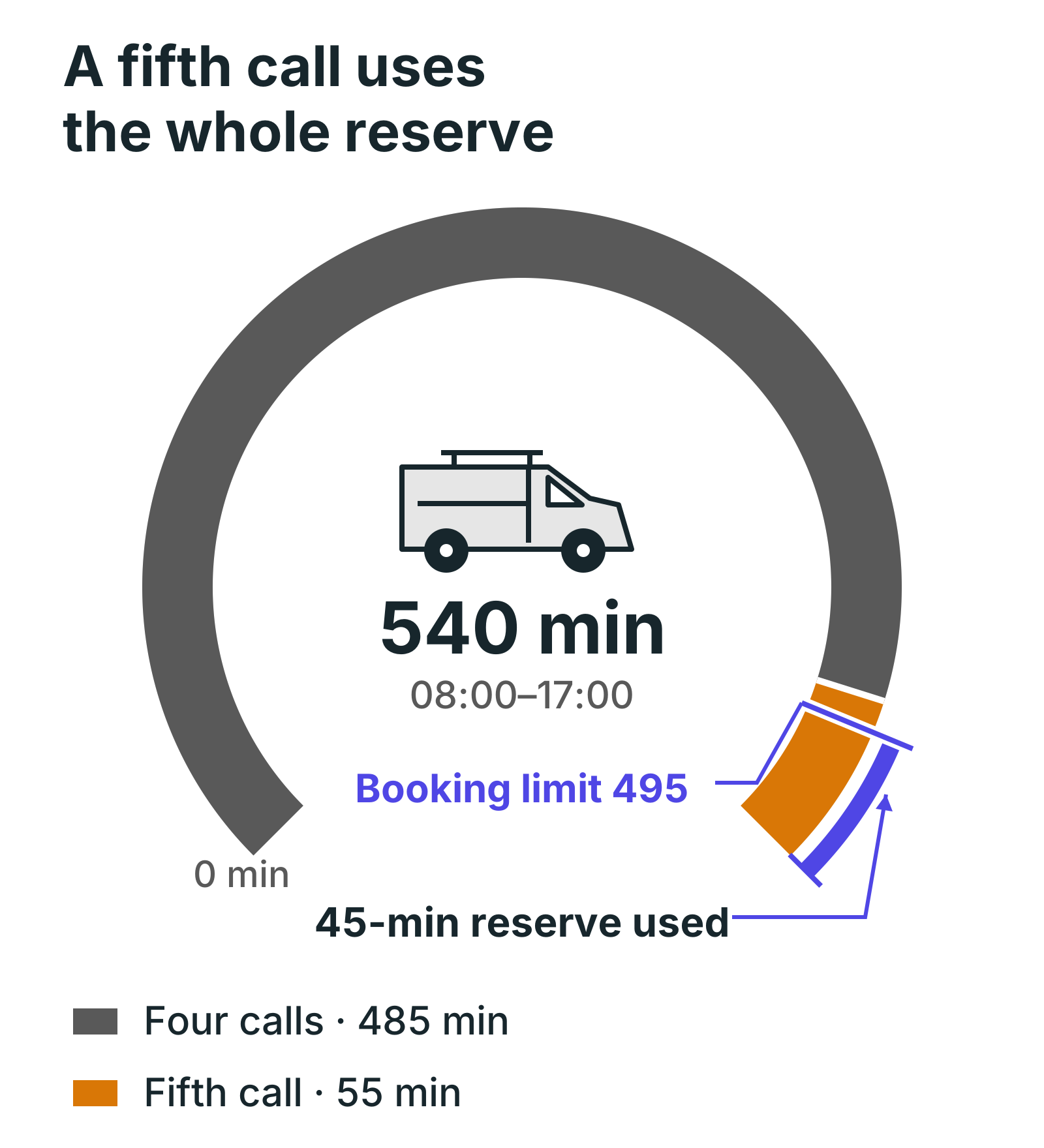
The dashed line is 495 booked minutes: the 540-minute day less the forty-five-minute reserve. Four calls use 485 minutes, leaving fifty-five minutes before restocking, of which forty-five stay protected. A short fifth call uses the whole day and leaves no reserve. A longer repair pushes the day beyond the shift even without the fifth call.
Build the route from named visits
Ellis has routine service at Alder, a diagnostic visit at Birch, maintenance at Cedar and a repair at Elm. These are planned durations, including the work each visit needs. Diagnosis remains an estimate; finding another fault changes the plan.
| Visit | On-site time | Drive to the visit | Planned arrival | Service finish |
|---|---|---|---|---|
| Alder service | 60 minutes | 20 minutes | 08:35 | 09:35 |
| Birch diagnostic | 90 minutes | 25 minutes | 10:10 | 11:40 |
| Cedar maintenance | 60 minutes | 10 minutes | 12:00 | 13:30, after lunch |
| Elm repair | 75 minutes | 20 minutes | 14:00 | 15:15 |
Each visit has ten minutes of wrap-up after service. Cedar's service starts at 12:30 because lunch comes first. Ellis closes Elm at 15:25 and drives twenty-five minutes back to the depot, arriving at 15:50. The remaining time until 16:45 is unbooked; van restocking still finishes at 17:00.
The day's visits need 285 minutes on site. Driving, including the return to the depot, needs 100 minutes. Wrap-up adds forty minutes. Briefing, lunch and restocking add sixty. Total booked time is 485 minutes, leaving fifty-five out of the 540-minute shift.
Write down what your company calls a visit's duration. If the booking already includes paperwork, adding wrap-up again will overstate the load. If the booking covers only hands-on work, leaving the paperwork out will understate it. Use the same definition throughout the route.
Use the remaining minutes before using an average
For Ellis, the calculation is: 540 minutes minus sixty of fixed activities, 100 of travel, forty of wrap-up and forty-five held in reserve. That leaves 295 minutes for planned on-site work. The booked visits need 285, leaving ten minutes beyond the protected reserve.
An average can be a first check when visits are genuinely similar. Divide the available time by the complete cost of a typical call: service, its share of driving and wrap-up. Round down, then place the actual visits on the day. A result that looks comfortable in total can still fail because of an appointment window, lunch or a long drive between two fixed bookings.
Ellis's visits are different lengths, so the named route is the useful check. A day of diagnostic work needs a different allowance from a tight group of maintenance calls. Estimate from your own completed work and route history, then compare the estimate with what actually happened.
The Microsoft schedule-assistant documentation describes matching availability, skills and location and estimating travel. Those are useful checks to ask of dispatch software. A suggested technician still needs the right parts and enough time for the work you are promising.
Test the extra call before accepting it
Suppose dispatch wants to add Ash after Elm. Ash needs thirty minutes on site, ten minutes of wrap-up and fifteen minutes of extra driving; the return from Ash to the depot still takes twenty-five minutes. That adds fifty-five minutes to the route.
Ellis gets back at 16:45, restocks and finishes at 17:00. The fifth call fits the clock, but every minute of the reserve has been sold. If your rule is to protect forty-five minutes, that booking fails the rule. It needs another technician, another day or an explicit decision to accept the reduced margin.
Now keep four calls and make Birch take an extra hour. The longer visit pauses for lunch and finishes at 13:10. After wrap-up and travel, Cedar starts at 13:30 and finishes at 14:30. Elm starts at 15:00, finishes at 16:15, and Ellis reaches the depot at 16:50. Restocking ends at 17:05.
That day has five minutes of overtime and no reserve. Calling four visits a light workload would hide the problem. If Elm instead takes fifteen minutes less than originally planned, the unchanged route leaves seventy minutes before restocking. Both changes come from visit duration, with the call count staying the same.
Where the capacity calculation stops
A total in minutes cannot tell you which technician should take a particular call. Check qualifications, parts, travel and the customer's accepted window before moving work. Keep technical work and safety decisions with the technician; a dispatch target must not decide how a repair is done.
When a visit runs long during the day, use the remaining work rather than recalculating the whole morning. The HVAC overrun example shows how to move an appointment that another technician can cover. For repeat work, the recurring service schedule example shows why next week's repeat bookings and travel also matter.
For a new call, check the shift, protected time and the full route cost first. For a promised arrival, check the actual position in the route. Those are different checks, and you need both before confirming the booking.
Set tomorrow's booking limit from tomorrow's work
- Copy one real day into the capacity worksheet, replacing the example durations and drives.
- Include the first departure, return to base, paperwork and fixed duties.
- Agree the reserve you want to protect, using your own variation in job and travel times.
- Place the named visits around breaks and customer windows, then test a longer call.
- Confirm another booking only when its full cost fits the remaining time.
In ArchiPlan, each technician's shift and breaks sit in their calendar and every visit carries its drive time, so a fifth call either fits or shows as late before you confirm it. It doesn't plan routes, so the drive times still come from you: try it on tomorrow's calls.
ArchiPlan Editorial publishes our planning guides. Artyom Rabzonov is responsible for product and editorial direction.
Artyom on LinkedIn · ArchiPlan on LinkedIn · How we check examples