
ERP software for small manufacturers: five systems and a planning alternative
Compare MRPeasy, Katana, Odoo, ERPNext, Fishbowl and ArchiPlan with a common job set, setup questions and a downloadable planning demo worksheet.
Your orders, stock and production dates live in different places, and keeping them together has become a job of its own. Start your shortlist with MRPeasy, Katana, Odoo, ERPNext or Fishbowl if you need manufacturing records as well as planning. Choose the systems that handle your actual orders and setup needs, then ask each supplier to schedule the same work before you sign.
Use the demo jobs and comparison worksheet to record what you see. This is part one of a planning-software series: ERP/MRP options first, dedicated schedulers next. The options below are compared from official documentation checked on 24 October 2026; they have not been run through our example.
Give the supplier an ordinary awkward day
Take a made-up finishing shop. Maya cuts and polishes four orders: twenty-four brackets, twelve guards, eighteen plates and forty clips. Each order needs an hour of cutting, an hour of polishing and two hours in the oven. Cutting and polishing each include fifteen minutes of setup and forty-five minutes of work. Oven handling is included in polishing; the cure needs only the oven, with one order per run.
Maya is the only person signed off for both attended stages. Working hours are 08:00–12:00 and 13:00–17:00. Nothing is already running, operations cannot cross lunch, and the agreed order is brackets, guards, plates, clips. All materials start ready.
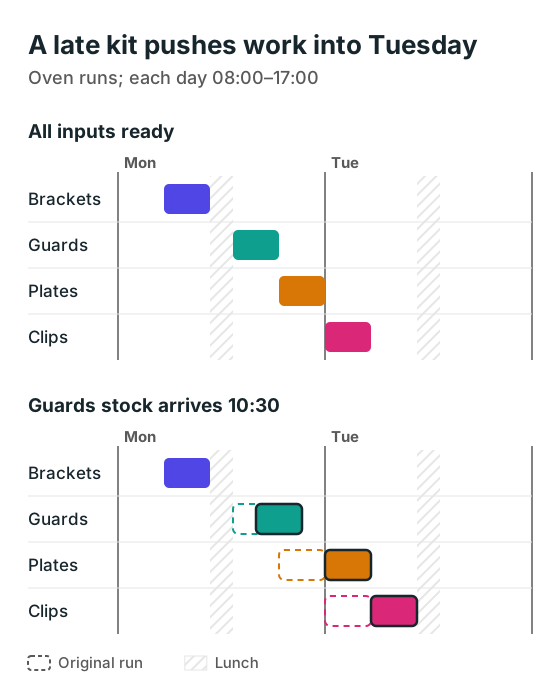
The brackets finish Monday at noon, guards at 15:00, plates at 17:00 and clips Tuesday at 10:00. Those are also their due dates. Now change the guards' stock release to Monday at 10:30. With the same sequence, guards finish at 16:00, plates Tuesday at 10:00 and clips Tuesday at noon.
The diagram shows oven occupancy, not Maya's whole day. The plate run moves because Maya's earlier cutting and polishing have moved. A free oven cannot finish an order whose preparation is still waiting.
Ask the supplier to show that chain. A material-shortage warning is useful, but you also need the resulting dates and a clear list of late orders. Collect the production scheduling inputs before the demo so a missing routing does not become a made-up duration.
Five manufacturing systems to investigate
| System | Start here when | Setup work to settle |
|---|---|---|
| MRPeasy | You need manufacturing planning, BOMs and stock together | Name your data owner and confirm what onboarding covers |
| Katana | Inventory and manufacturing need to connect with your sales workflow | Advantage has scoped vendor setup; agree who prepares your data |
| Odoo | You want manufacturing within a broader business suite | Name an in-house owner or implementer and quote the configuration work |
| ERPNext | You want an open-source ERP and can give someone responsibility for it | Assign hosting, configuration, upgrades and support |
| Fishbowl Manufacturing | You want manufacturing and inventory linked to existing accounting | Confirm who migrates the records and maps the accounting connection |
The five systems combine manufacturing records with planning. A dedicated planning alternative follows the system comparisons for readers who want to keep their existing business records.
MRPeasy: check the plan against the routing
MRPeasy's published plans include production planning, BOMs, stock management and drag-and-drop rescheduling. Its Starter rate was listed at US$49 per user per month when checked. Professional adds functions including subcontracting and parallel operations, so the cheapest subscription is not automatically the right comparison.
Bring a real routing and identify who needs access: the planner, stores and people reporting work. Ask the supplier to price that group and demonstrate the material change above. If outside finishing is part of your route, have the supplier show how it is represented in the quoted plan.
Katana: price the setup you will actually use
Katana's current pricing page describes a Free plan with a small catalogue limit and an Advantage plan with custom pricing under an annual contract. Advantage includes scoped setup and implementation support. Older fixed-price comparisons can therefore give you the wrong budget.
Ask for your manufacturing, purchasing and sales workflow in the scope of work. Have the supplier explain how production dates change when materials arrive late, who reports actual progress and which integrations are included. A connected inventory view does not, by itself, prove that Maya cannot be booked on two operations at once.
Odoo: settle edition and implementation ownership
Odoo's version 19 work-centre documentation describes working hours, alternative work centres, setup and cleanup time, and allowed employees. Those are useful details to investigate for this shop.
Ask the implementer to demonstrate the shared-worker rule as well as each machine's calendar. Get the edition, hosting, API access and any custom work written into the quote. The public pricing page could not be fetched for this check, so no Odoo subscription figure is used here. Include configuration and ongoing changes in your budget alongside licences.
ERPNext: give somebody the keys to the system
ERPNext's Production Plan documentation covers planning production and material requirements from orders and BOMs. Frappe's pricing explanation separates open-source software from hosting and implementation costs.
Choose who will maintain item records, routings and working calendars before choosing who hosts it. During the demo, follow an order through the plan into work orders and back from reported progress. Ask how the proposed installation handles the operator conflict and late stock. Free software licensing does not remove the work of configuring and maintaining your process.
Fishbowl: keep the accounting connection in view
Fishbowl's manufacturing offering describes BOMs, work orders, inventory and production planning, with accounting connections including QuickBooks. It is worth investigating when you want to retain your accounting system and improve the manufacturing records around it.
Have the supplier identify the exact accounting edition, manufacturing package and deployment in the quote. Check stock movements and work-order updates in both directions. Then run the same scheduling test: accounting connectivity tells you little about whether shared people, lunch or a changed material date are correctly reflected in the plan. Get a local quote; a price for another region is not your budget.
A dedicated alternative: ArchiPlan
Our own product approaches setup through ordinary language: you describe processes, people, equipment and working hours, and the system guides you towards a structured planning setup. The aim is to help you see what can fit and what has to move when work changes.
ArchiPlan is available with guided setup and operational scheduling. Keep accounting, purchasing and stock records in their existing system. Use the same worksheet and acceptance questions as for every other option, and confirm how your records will reach the plan. See how ArchiPlan works.
Take a written scope away from the demo
A useful shortlist leaves you with evidence and a named owner for the next step. Keep the supplier's screen result, the edition used and any manual work needed to get there. Add the full cost of migration, hosting, configuration, training, support, integrations and leaving the system later.
- Give each supplier the same job file.
- Record the original dates and the dates after the stock change in the comparison worksheet.
- Ask who will maintain the inputs and resolve a failed update.
- Keep the options that pass your essential checks within a cost you can support.
If the business records already work and only the schedule is failing, first test the scheduler you already have. For a shared-worker check, use the people and workspace example.
ArchiPlan Editorial publishes our planning guides. Artyom Rabzonov is responsible for product and editorial direction.
Artyom on LinkedIn · ArchiPlan on LinkedIn · How we check examples