
APS software compared: six production scheduling options to test
Compare frePPLe, just plan it, PlanetTogether, Asprova, Opcenter APS and ArchiPlan with a shared-worker test and a downloadable scheduler comparison worksheet.
Your business system holds the orders, but you still rebuild the production sequence by hand when people or materials are missing. Compare frePPLe, just plan it, PlanetTogether, Asprova and Siemens Opcenter APS against your real resource rules. Keep the options that can explain a feasible revised schedule and the data exchange your team will have to maintain.
Use the common job file and scheduler comparison worksheet. This second part of our planning-software series focuses on dedicated scheduling. The comparison uses official documentation checked on 24 October 2026; the example is a manual reference calculation, not a hands-on software benchmark.
Ask what changes when one person is absent
Use a made-up finishing shop with twenty-four brackets, twelve guards, eighteen plates and forty clips. Maya is the only person qualified for cutting and polishing. Each of those stages needs fifteen minutes of setup and forty-five minutes of work. Each order then uses the oven for two hours, one order at a time. Handling is included in polishing; the cure needs the oven alone.
The working day is 08:00–12:00 and 13:00–17:00. Operations cannot cross lunch. All material is ready, nothing is already running and the agreed sequence is brackets, guards, plates, clips. This deliberately keeps the dispatch order fixed so you can compare how products handle the same constraints.
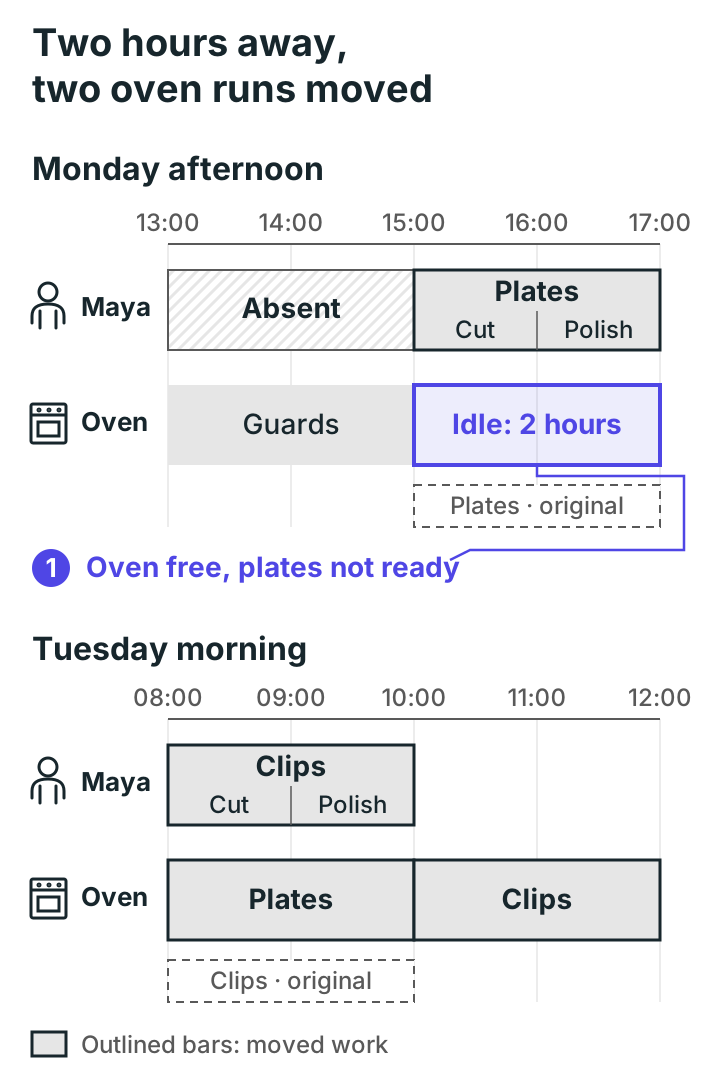
With Maya present, brackets finish Monday at noon, guards at 15:00, plates at 17:00 and clips Tuesday at 10:00. Set those as the original due dates. Now make Maya unavailable Monday from 13:00 to 15:00. Brackets and guards still finish on time; plates finish Tuesday at 10:00 and clips at noon.
The figure shows oven runs. The oven has space on Monday afternoon, but plates cannot use it until Maya has cut and polished them. Her plate cutting moves to 15:00–16:00 and polishing to 16:00–17:00. The two-hour cure then waits until Tuesday.
An APS should be tested on that chain, including the person needed alongside the machine. A prettier machine chart will not solve a missing worker booking.
Which scheduler is worth a demo?
| Option | Reason to investigate | Check before choosing |
|---|---|---|
| frePPLe | Open-source planning and commercial editions | Which edition includes the interaction and planning functions you need? |
| just plan it | Finite scheduling aimed at job shops | Can its model represent your people, stages and updates? |
| PlanetTogether | Finite-capacity scheduling with ERP/Excel data exchange | Who owns the integration and conflict handling? |
| Asprova | Detailed finite-capacity scheduling and data import/export | Which modules and scheduling rules match your process? |
| Siemens Opcenter APS | Planning and detailed scheduling within a product family | Which product and edition is actually being demonstrated? |
| ArchiPlan | Guided setup for operational planning (our product) | Does its setup capture your people, stages and changes? |
The final entry is our product. All entries need the same proof of fit. There is no overall winner here: the useful result is a shortlist supported by your own demonstration and a written implementation scope.
frePPLe: separate the editions
frePPLe's edition comparison describes finite material and capacity planning in Community, with features such as an interactive Gantt and due-date quoting listed under Cloud. Its pricing model varies with modules, item/location count and infrastructure.
It is a reasonable lead when your team wants to evaluate an open-source planning core or a commercial service around it. Ask for the exact edition in the demo and quote. Have someone demonstrate the worker absence and show how a planner changes and releases the resulting plan. Include hosting, support and model maintenance in the comparison.
just plan it: start with the shop-floor sequence
The official product page describes automatic finite scheduling for job shops and multi-operation manufacturers. That makes it worth investigating for a small shop moving beyond a manually maintained sequence.
Show the supplier how you report starts, completions and remaining work. Ask it to model Maya as a shared person, then remove her afternoon availability. Record which inputs were required and whether the resulting plan keeps the agreed sequence. Get a written price and confirm the data-transfer method; the product description alone does not establish a connector to your ERP.
PlanetTogether: follow the round trip
PlanetTogether's documented workflow describes importing ERP or Excel data, weighting scheduling objectives, making manual adjustments and sending scheduling data back to ERP. Its product page also describes finite-capacity scheduling and scenarios.
Ask who owns the round trip in your installation. Which system wins when an order changes during planning? How are failed updates shown? Can the planner see what changed before releasing dates to the floor? Price the configured connection and its support, alongside the scheduling software. A named ERP on a supplier's website does not settle your version, fields or update rules.
Asprova: bring the constraints that cause arguments
Asprova's official overview describes finite-capacity production scheduling and differential data import and export. Put it on the evaluation list when detailed sequencing and several interacting resource rules are central to your problem.
Start with the simple worker absence, then ask how the proposed module represents your real batch equipment. If an oven can combine orders, the supplier must show capacity, compatibility and loading rules; our reference example intentionally allows one order per run. Obtain the required modules, deployment, configuration effort and local price in writing. Do not infer those from the product-family name.
For outside finishing, ask every supplier to represent the order leaving your shop and the date it is expected back. Change that return date and check which later operations move. Agree whether supplier capacity is modelled or the return is simply an input date; those answer different planning questions.
Siemens Opcenter APS: identify the actual product
Siemens' APS explanation distinguishes broader planning from detailed scheduling with resources, tooling and material constraints. It links APS to the Opcenter product family. The detailed product page was inaccessible during this check, so exact edition entitlements and prices remain to be confirmed.
Have the supplier name the scheduling product, edition and implementation services in its proposal. Use the worker calendar and late-material tests before exploring longer-term planning. Ask to see the fields exchanged with your existing ERP and who will maintain those mappings. A demonstration of aggregate capacity is not the same test as allocating one person across two attended operations.
ArchiPlan: test the guided setup as well as the plan
ArchiPlan is our own product. You start by describing your operation in ordinary language, and it asks about the processes, resources and working hours it needs. The result is a structured setup you use to plan and replan work.
Run the same job set when you try it, including Maya's two-hour absence, and check that the plates and clips move the way the worksheet says. Confirm data import/export and commercial terms directly, and agree how your existing business records will feed the plan. Record the demonstrated scope in the worksheet before deciding whether it fits.
Keep the evidence, the cost and the owner
Record each result as demonstrated, documented or still unknown. Keep the edition and any hand edits beside it. A planner dragging bars until the picture looks right can be useful, but it is different from the scheduler checking the rule automatically.
Use the input checklist to prepare records that somebody can maintain. If you have not tested the existing scheduler, use the ERP-versus-APS decision test first; it can narrow what you need a separate tool to do.
- Send every supplier the same job file.
- Record the absence test and a material change in the comparison worksheet.
- Ask for subscription, hosting, implementation, migration, training, integration, support and exit costs in one scope.
- Name the person responsible for calendars, durations and failed data updates after go-live.
To run that test on your own jobs, try ArchiPlan.
ArchiPlan Editorial publishes our planning guides. Artyom Rabzonov is responsible for product and editorial direction.
Artyom on LinkedIn · ArchiPlan on LinkedIn · How we check examples