
Preventive maintenance checklist template: keep missed work visible
Download free maintenance task and completion registers. Keep fixed due dates and missed visits visible when later work is completed. No signup needed.
A completed maintenance task can hide an earlier missed visit if you keep only the latest date. Give every due occurrence its own record, and keep the approved task separately. Download the free task register and occurrence log; both open in Excel without a signup.
A green cell can hide a missed week
Take a made-up packaging plant. Bea coordinates maintenance on a packing conveyor. Its approved site job plan, PM-17, has a fixed weekly due date anchored to Monday 2 November 2026. The interval is an assumption for this example, not maintenance advice for your conveyor. Use the equipment guidance and your site's approved maintenance rules for the real task.
Bea records the first visit as completed on Wednesday 4 November. The visit due Monday 9 November is missed. The next visit is completed on Monday 16 November.
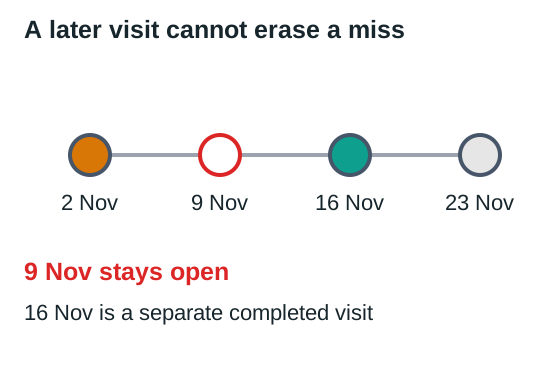
A sheet with a single Last completed cell now shows 16 November. Anyone checking only that cell could think the task has been done each time it was due. The separate occurrence log still shows the gap on 9 November, ready for the maintenance lead to review.
| Original due date | Completion date | Record to keep |
|---|---|---|
| 2 November | 4 November | Completed two days late |
| 9 November | Blank | Missed; review required |
| 16 November | 16 November | Completed on its own due date |
| 23 November | Blank | Next planned occurrence |
Retaining the missed record does not mean blindly repeating work already covered by a later visit. The maintenance lead decides whether anything remains to be done, whether the later work covers the missed scope, and how that decision is recorded. The date history should survive either way.
Keep the instruction separate from the event
The task register says what recurs. The occurrence log says what happened when that task was due. Changing the plan for next month should not rewrite last month's completion history.
In maintenance-tasks.csv, replace the example task ID, asset, approved procedure reference, due rule, anchor date and owner. Keep the detailed maintenance instruction in the controlled job plan. A scheduling register does not replace the procedure, authorisation or safe-work arrangements.
Use a stable task ID so equipment renaming does not break the link to its history. The asset name should be recognisable on the floor. A generic entry such as "check machine" leaves the next person unable to tell which work was intended or whether the completed work matches it.
The occurrence log needs a separate ID for each due visit. In the sample, the ID combines PM-17 with its original due date. Keep that original date when work moves. Add the revised booking or completion date in another field rather than overwriting the event that was missed.
| Field | What you enter |
|---|---|
| Occurrence ID and task ID | The particular due visit and its approved task |
| Original due date | The date the approved rule produced |
| Completed date | Actual completion, left blank until confirmed |
| Status | Due, booked, completed, missed or reviewed |
| Owner and next action | Who resolves an unfinished or uncertain record |
| Evidence | Work-order reference or completion record |
The CSV files contain ordinary fields and example records. They do not generate future work orders, calculate new due dates or send reminders. Add future occurrences from your approved plan and review them at the cadence your site uses. If that becomes too much manual work, use a system that can create occurrences while retaining their history.
Choose the right due-date rule
Fixed-calendar work and work due after completion behave differently. With the fixed weekly rule above, completing the 2 November visit on 4 November does not move the next original due date from 9 November. Adding seven days to the late completion would instead produce 11 November and quietly shift the programme.
A completion-based rule intentionally starts the next interval after the actual completion. That can be correct for a task with that approved rule. It is a different decision, not a convenient spreadsheet correction for an overdue cell. Record which rule applies before you build the dates.
Usage-based tasks need their own trigger, such as an approved operating-hours threshold and a reliable meter reading. Do not force them into a calendar interval merely because the sample has a Date column. The register can identify the rule and owner while the approved system supplies the actual due event.
IBM's maintenance scheduling guidance separates deciding when and who will do maintenance from planning the work itself. The register supports that coordination; it does not determine maintenance frequencies or technical scope.
Close an occurrence with evidence
Before marking a visit completed, confirm the actual scope against the work order. A technician attending the asset is not necessarily the same as completing the approved task. Record partial work or an access problem plainly so the next planner knows what remains.
If the 9 November work was missed, Bea assigns the review to the maintenance lead. If the lead concludes that the 16 November visit covered the outstanding scope, retain the missed event and its resolution reference. If more work is required, create the appropriate follow-up through the site's normal process. Do not turn a status colour into technical authority.
An agreed production window belongs beside the booking. Use the complete downtime check to include release and return to service, and confirm the people needed together. A due date on its own does not reserve the asset or the crew.
When the register needs a different tool
A small list is manageable while one person can reconcile each due event with its work order. It becomes harder when several people edit the same task, meter readings drive the dates, or a reschedule changes many bookings. At that point, ask a maintenance-system supplier to demonstrate the missed-week example above.
The demonstration should retain the 9 November event after the 16 November completion, show its review decision, and create the next occurrence under the correct approved rule. An automatically green status without that history does not solve the problem.
Start with a task whose latest completion date looks healthy. Trace its last few original due dates to the actual work orders. Keep any missed event visible and give its next review to a named person before changing the status.
ArchiPlan Editorial publishes our planning guides. Artyom Rabzonov is responsible for product and editorial direction.
Artyom on LinkedIn · ArchiPlan on LinkedIn · How we check examples