
Production capacity planning template: find the overloaded work centre
Download a free Excel capacity planning template. Count setup once per batch, check machine and operator hours, and see where next week is overloaded.
The week looks quiet until you add the setup hours. Check each work centre against its own available hours before accepting another order. Download the free capacity planning workbook to count machine time and operator time separately.
The lathe has room; the mill does not
Take a made-up small machining shop planning one Monday-to-Friday week. Lara works on a mill and a lathe. The normal staffed day is 08:00–12:00 and 13:00–17:00. Each machine starts with 40 hours for the week. The mill has two hours of agreed maintenance and the lathe has four. Lara has eight hours of leave and two hours of meetings, leaving 30 hours for these orders.
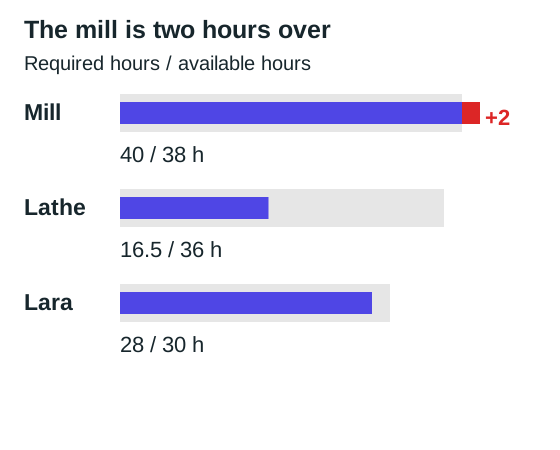
The mill needs 40 hours but has 38. The lathe needs 16.5 of its 36 available hours. Lara needs 28 of her 30 available hours. Free time on the lathe does not remove the mill's two-hour overload: these orders have approved routes on the machines shown.
All material, tooling and programs are ready for the week. Machine hours include setup and the run. Attended hours include Lara's setup, loading and required checks; the remaining run time is approved to continue without her constant attendance. These are separate estimates, rather than an assumption that a machine always needs a person beside it.
| Order | Machine | Quantity | Minutes per piece | Setup hours | Machine hours | Lara's hours |
|---|---|---|---|---|---|---|
| Flanges | Mill | 120 | 8 | 2 | 18 | 8 |
| Housings | Mill | 80 | 12 | 3 | 19 | 10 |
| Rush brackets | Mill | 20 | 6 | 1 | 3 | 2 |
| Shafts | Lathe | 100 | 9 | 1.5 | 16.5 | 8 |
The flanges and housings alone need 37 mill hours. They fit the weekly total. Adding the brackets takes the load to 40, so accepting that order for the same week requires a change to capacity, the route or another order's date. A louder priority does not provide the missing hours.
What to enter in the workbook
On Capacity, replace the example resource names or add yours in the blank rows below Lara. Give each a unique name, choose Machine or Person, and enter its gross and unavailable hours. The file has room for 20 resources, so you can enter ten presses and their operators without changing formulas.
On Jobs, replace the example batches or use the blank rows below them. Choose the actual machine and operator for each row. Both selection lists show the resource names; the input check rejects a person entered as a machine, or a machine entered as an operator. All four sample batches belong to Lara, but another person's work adds to their own total once you add and assign them.
The machine-hours calculation is quantity * minutes per piece / 60 + setup hours. The flange row on Jobs uses D6*E6/60+F6, inside an input check. Setup belongs once to this batch. If an order needs two batches with a fresh setup for each, enter two rows with the separate batch quantities and their own setup hours.
Operator hours also calculate from quantity: fixed attended hours + quantity * attended minutes per piece / 60. Fixed attendance includes attended setup, loading and completion work. The flanges need two fixed hours plus three attended minutes per piece, giving eight hours for Lara. Machine run minutes and operator attended minutes are separate estimates: changing a cycle speed does not automatically change how much attention it needs.
Changing quantity updates both totals. When you change the method or speed, review both per-piece estimates and the fixed work with the operator. Keep minutes and hours distinct, and do not count attended setup again outside the fixed-attendance field.
Available hours are gross hours less unavailable hours. The file adds machine hours by machine name and attended hours by operator name, then subtracts each load from that resource's available hours.
For the mill, the required-hours cell uses SUMIFS(Jobs!$G$6:$G$105,Jobs!$B$6:$B$105,A6) after checking that the job inputs are complete. Missing inputs stay visible. A negative spare-hours result means the load exceeds capacity; it is not an instruction to work overtime.
Open the workbook, change a quantity and check the machine and operator totals. The blank rows already contain formulas for up to 100 batches. Beyond those stated bounds, extend the inputs, formulas and total ranges together before trusting the result.
Keep capacity losses in one place
Use the agreed operating calendar as the starting point. Remove the maintenance booking from the machine and Lara's leave from her own hours. Do not subtract either a second time through a general allowance that already includes it.
If your historical run times already include normal short stops, say so beside the estimate. If they are ideal cycle times, a realistic allowance may still be needed. Pick one treatment and use it consistently across the jobs you compare. You need a load figure the floor can explain.
Microsoft's Business Central documentation describes calendars, capacity and efficiency as separate inputs to production scheduling. That is useful context for this separation; the workbook's numbers come from the made-up shop above, rather than a recommended efficiency percentage.
Use the red number to make a specific decision
For the brackets, the question is where the missing mill time will come from. Ask whether the customer can take the work later, an existing order can move with agreement, or an approved alternative machine can do it. Extra attendance from Lara alone does not solve a machine-hours shortage.
Doubling the brackets to 40 pieces would make their mill load five hours, taking the mill's week to 42. The setup remains one hour. Removing the bracket order entirely leaves the original 37 hours. These quick changes help you distinguish volume-driven work from time that occurs once per order.
Before you alter the available hours, confirm the change with the people who own the machine and the shift. An unapproved extra shift is still an assumption. Keep the customer date pending until the missing capacity has a real answer.
A weekly total is only the first check
A week can fit in hours and still fail in sequence. A predecessor may finish too late, or both machines may need Lara at once. Check the operator's attendance at the actual times, then use current production scheduling inputs to place the operations.
When the spreadsheet becomes difficult to keep current, use these same orders to test a scheduling tool. Ask it to show the mill overload and Lara's separate bookings before you judge the screen.
Start with next week's busiest work centre. Enter its real available hours, include the setups and check the resulting gap with the operator before promising another delivery.
ArchiPlan Editorial publishes our planning guides. Artyom Rabzonov is responsible for product and editorial direction.
Artyom on LinkedIn · ArchiPlan on LinkedIn · How we check examples